How to Make a Gas Station Dance Video From One Photo
Generate a personalized gas station dance video from one photo and a preset scene and motion template. Choose solo or friends, prepare your photo, and preview the result.
To generate a personalized gas station dance video, upload one clear photo of yourself to Gas Station Dance AI in Just me mode. AI uses your photo for your appearance and outfit, and our preset template for the scenes and movement: the dance, the selfie and the car exit. You get a vertical 720p MP4 of about 15 seconds in about 5 to 10 minutes, using 100 credits. You only upload your photo; the scene and motion template is already provided.
Make the gas station dance from one photo
- Pick Just me. You play the dancer, the selfie and the car exit.
- Add one photo. A full-body, front-facing photo in even light works best, because it has to carry all three shots.
- Sign in and generate. Each video uses 100 credits; the $9.90 starter pack covers one.
- Download the MP4. Take the version with our soundtrack to post as it is, or the silent copy to add the trend's sound in the app.
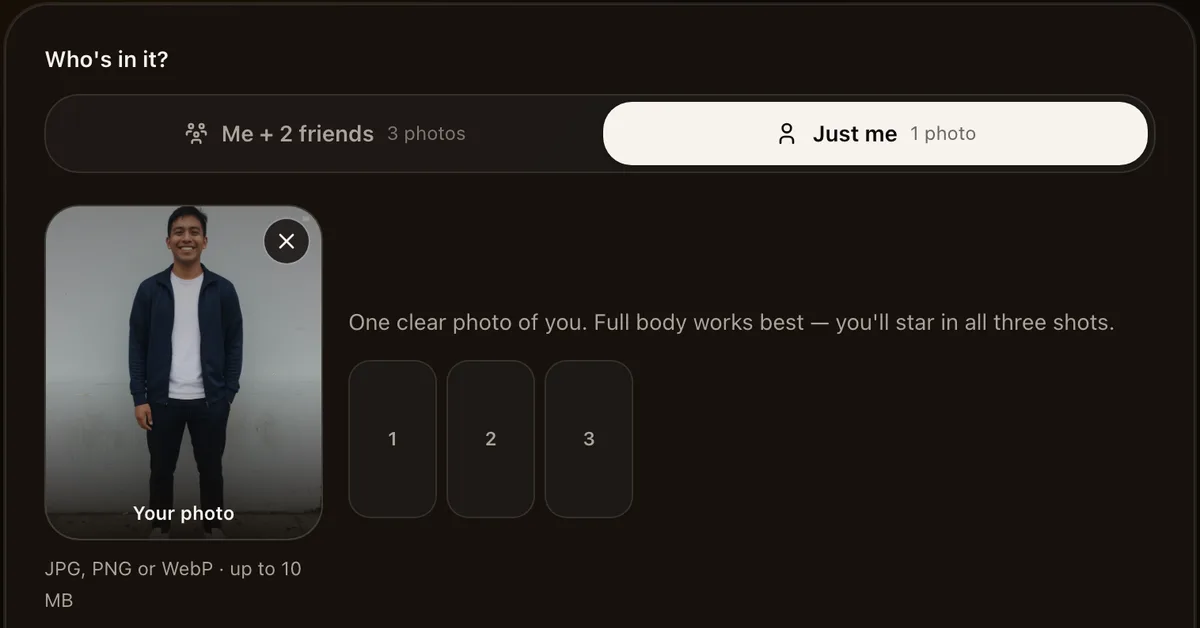
The full walkthrough, with every screen, is in how to make a gas station dance AI video.
How does photo-to-video generation work?
AI uses your photos for your appearance, and our preset template for the scenes and movement. It generates a personalized video following the dance, selfie and car-exit sequence shown in our samples. Individual details can vary, so preview the full video before sharing it.
In Just me mode, your photo is used for all three roles. With Me + 2 friends, each uploaded photo supplies a different role. Choose the mode before uploading so the cast matches the video you want, then check all three shots in the finished preview.
You do not need to type a prompt or supply a video. If you want to explore a different setting or mood, our gas station dance prompt guide has creative examples and advice on choosing by the finished result.
What becomes you, and what stays the same
| Part of the video | What to expect |
|---|---|
| Dance, selfie and car exit | The prepared sequence shown in our examples |
| Music | Our own AI soundtrack, plus a silent copy for the official sound |
| Your face and hair | Personalized from your photo; check the finished preview |
| Your outfit | Show the clothes you want in your photo; unseen details may vary |
That is why the photo matters more than anything else. A face-only selfie still works, but AI has to invent your clothes and body for the dance and the car exit. A full-body photo keeps your real outfit in every shot. See which photos work best for good and bad examples.
Put yourself in with two friends
The original clip has three people, so you can also take one role and give the others to friends. Pick Me + 2 friends and upload three photos in order: dancer, selfie, car exit. You can take any of the three slots. A trio costs the same 100 credits as a solo video. Who should play which role helps you cast it.
Check your video before posting
Watch the full MP4, including the selfie and car exit. Check that you recognize your face in each shot, that the outfit looks right, and that the soundtrack plays as expected. A good opening frame alone does not tell you how the rest of the video looks.
Our generator offers the prepared sequence shown in its samples, rather than custom choreography or a different setting. If you are comparing options, our generator comparison covers the photo requirements, output formats and purchase prices.
Before you upload
- Use your own photo, or a photo of an adult who agreed. No celebrities and no minors.
- Your photos are not kept for long. We normally delete our copy of uploaded photos after about 7 days. AI providers have separate retention rules; see the Privacy Policy.
- A failed video costs nothing. If a photo is rejected or a video fails, your credits go back to your balance automatically.
FAQ
Can I put myself in the gas station dance with just one photo? Yes. In Just me mode, one photo puts you in all three shots: the dance, the selfie and the car exit.
Can I use a selfie? Yes, but a selfie only shows your face, so AI fills in your outfit and body. Use a full-body photo if you want to wear your own clothes in the video.
How are my photos used? AI uses your photos as appearance references, including your hair and clothes. Use an image that shows the outfit you want, and preview the result: details can change, especially where the photo does not show the whole body.
Do I need the original gas station dance video? No. The generator already has the three shots. You only upload your photo.
Will the dance look the same as the original? It follows the prepared dance, selfie and car-exit sequence shown in our samples, personalized with your photos. Check the examples before buying and preview your result, since individual details can vary.
How much does it cost? $9.90 for one 720p video with a soundtrack, paid once with no subscription. Is there a free option? See whether a free gas station dance AI generator exists.